

 Chloe Sackett
HVAC Field Service Management Software: What Contractors Get Wrong
Most HVAC contractors choose field service management software by counting features and judging the sales demo. That tells you what a platform can...

If you run an HVAC company, somebody is trying to sell you software this week. A rep at the supply house. An ad in your feed. A booth at the next trade show promising to "run your whole business from one screen."
Most of those pitches sound the same, and that's the problem. Contractors end up making one of two mistakes. They buy too much software too fast and spend six months paying for features nobody uses. Or they wait so long that the business outgrows spreadsheets and sticky notes, and the chaos costs more than any subscription would have.
Full disclosure before we go further: we make one of these tools. The New Flat Rate is menu pricing software for HVAC, plumbing, and electrical contractors. So you'll know exactly where we fit and where we don't, and we'll give you the full landscape either way.
This guide covers which software you need now, which can wait, and the one most contractors add last that should probably come first.
Before you compare features, run every tool through three questions. They'll knock half the options off your list in about ten minutes.
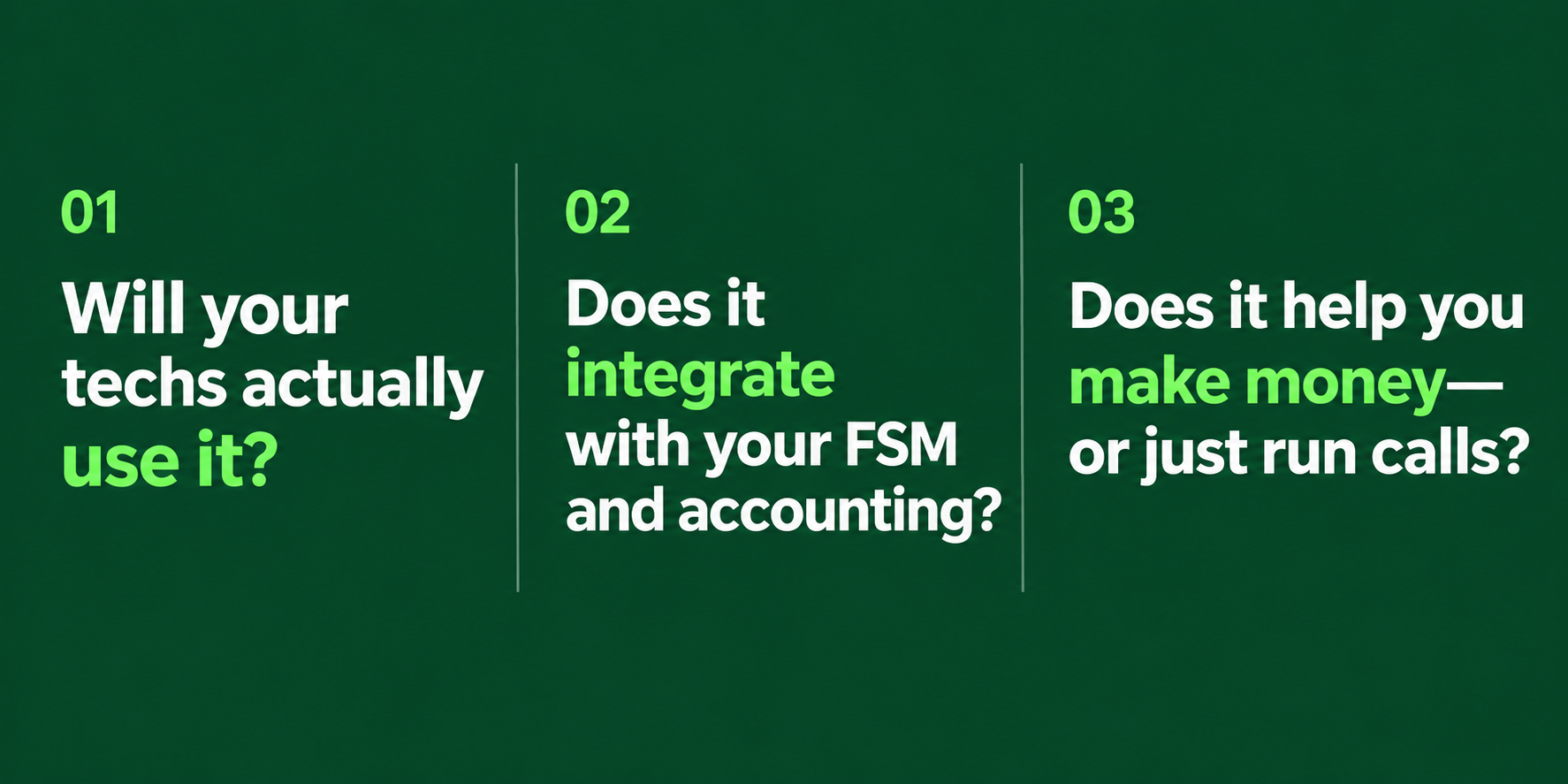
The best software in the world is worthless if your techs won't open it. Every tool you add has to work on a phone or tablet, in a driveway, with dirty hands and a homeowner watching.
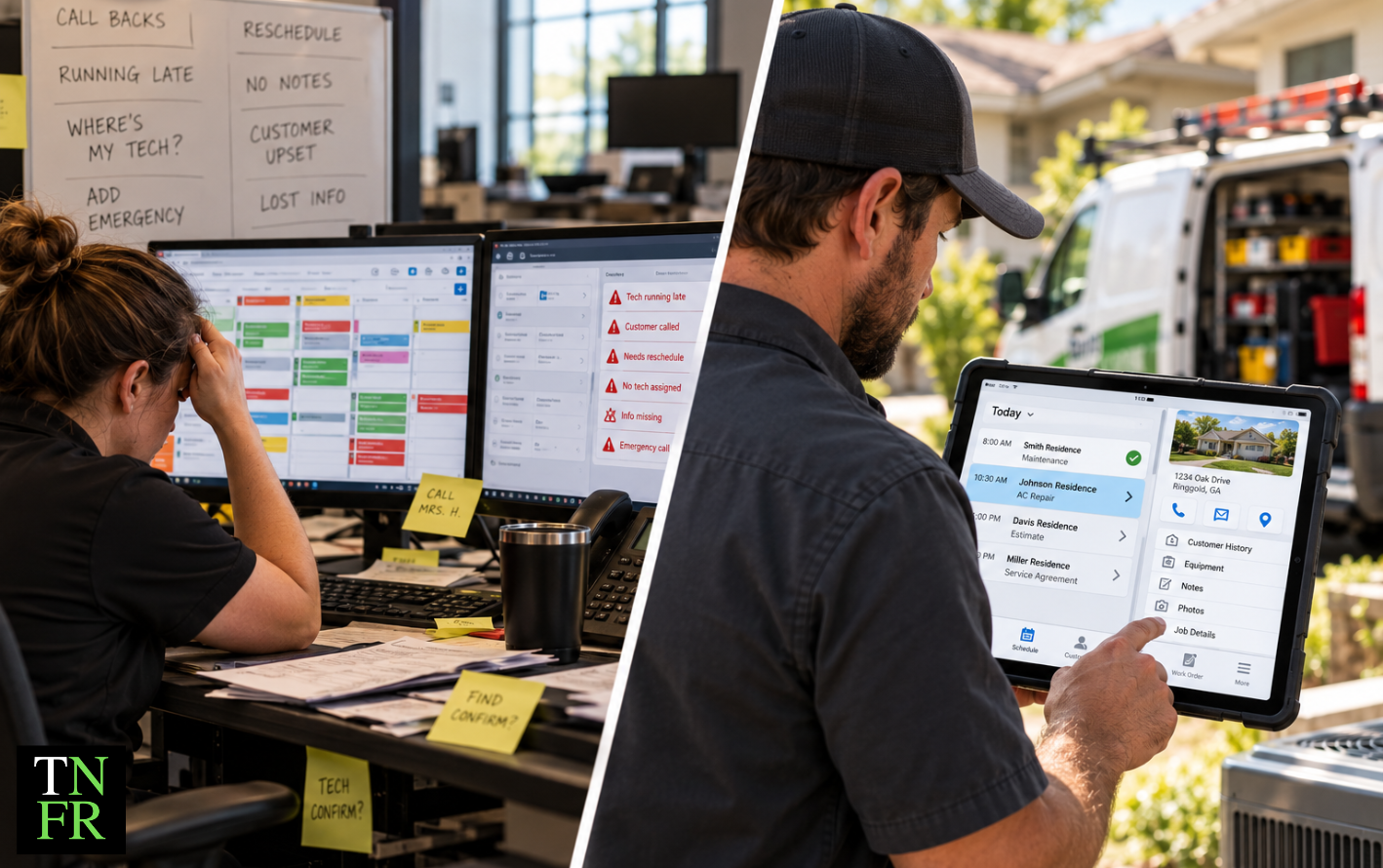
During every demo, hand the app to one of your techs. Not your office manager. Not your best tech who loves gadgets. Hand it to the guy who still writes tickets on paper. If he can figure it out in five minutes, you're in good shape. If he can't, that tool will become shelfware no matter what the rep promises.
Every time someone types the same information into two systems, you pay for it twice. Once in office hours, and again when the numbers don't match and somebody has to figure out why.
Ask every vendor exactly what integrates, and how. "We integrate with QuickBooks" can mean anything from a real-time sync to a spreadsheet export someone has to upload every Friday. Ask to see it working.
This is the question most contractors skip. Scheduling software makes you faster. Invoicing software gets you paid sooner. Both are good. Neither one changes what happens when your tech is standing in front of a homeowner with a price.
Efficiency on a bad margin is still a bad margin. Running more calls at the wrong price just means losing money faster. As you build your stack, make sure at least one tool is aimed at the ticket itself, not just the schedule.
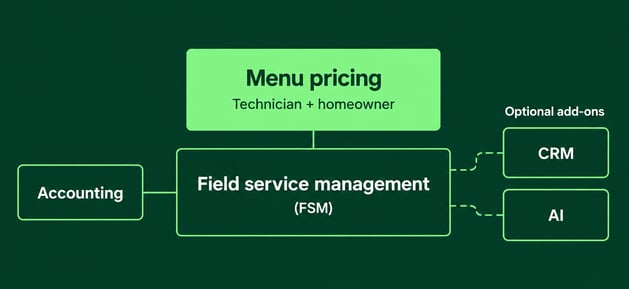
Field service management software is the backbone of most HVAC operations. It handles scheduling, dispatching, work orders, customer records, and job history. When a call comes in, your FSM is where it gets booked, assigned, and tracked until it's paid.
Who needs it: Anyone running two or more trucks. A one-person shop can get by with a calendar and a notebook for a while, but once you're coordinating multiple techs, you need a system.
Top tools: ServiceTitan, Jobber, Housecall Pro, and Service Fusion are the names you'll hear most. ServiceTitan is built for larger operations and priced like it. Jobber and Housecall Pro are easier to learn and more affordable for small and midsize shops.
What to watch for: Per-user pricing that climbs fast as you hire, annual contracts with steep cancellation terms, and implementation timelines. Larger platforms can take 60 to 90 days to get fully running. Ask what that looks like for a company your size.
Software handles the logistics of dispatch, but the decisions still matter. Which calls go first and which tech goes where both affect your revenue as much as your schedule. So does how you set up your dispatch board. Fluid dispatching, for example, builds your schedule around customer lead times instead of rigid time blocks.
A lot of software categories get sold as separate products when your FSM already covers them. Before you add another subscription, check what you're already paying for.
Invoicing and payments. Nearly every FSM includes invoicing, card processing, and payment collection. You rarely need a standalone tool here. The exception is customer financing. Offering monthly payment options can close jobs that would otherwise stall on price, and dedicated financing partners often approve more customers than what's built into an FSM.
Service agreements. Most FSMs can track memberships, schedule maintenance visits, and handle recurring billing. The software is the easy part. The hard part is building an agreement that keeps customers and actually makes you money. Get the structure right first, then automate it.
Technician mobile apps. Your FSM almost certainly comes with a tech-facing mobile app for job details, notes, photos, and time tracking. If your FSM's time tracking is weak, add-ons like Workyard and ClockShark fill the gap. Otherwise, use what you have before buying more.
This is the category most contractors don't know exists, and it's the one with the most impact on every single call.
Here's the difference. Your FSM has a price book. It stores what you charge for a capacitor, a coil cleaning, or a compressor replacement. That's useful. But a price book only answers "what does this cost?" It doesn't touch how the price gets presented, and that's where most of the money is won or lost.
Pricing on paper is a math problem. Pricing in the driveway is a sales problem. When a tech walks up with one number, the homeowner has two choices: yes or no. Most techs aren't trained salespeople, and they don't want to be. So they discount, hesitate, or quote the minimum repair because it feels safer.
Menu pricing software changes the conversation. Instead of one price, the tech presents five pre-built options for the repair, from a Platinum option down to a Band-Aid fix. The homeowner reads the options and picks the level of service that's right for them. No pitch, no pressure, no negotiating. The tech's job goes back to diagnosing the problem and explaining what they found.
Flat rate pricing still lives inside the menu. The difference is that the customer gets to choose, instead of the tech having to sell.

Where The New Flat Rate fits: This is what we build. Our HVAC pricing software sits on top of the FSM you already run, including ServiceTitan, Housecall Pro, and other platforms, so you don't have to replace anything. Contractors using it see a documented average ticket increase of $246 per service call.
If you're comparing tools in this category, judge each HVAC pricing app by how your techs present prices with it, not just how it stores them. And if you're building prices from scratch, make sure your numbers hold up first. A markup percentage can look right on paper and still lose you money in the field.
Want the groundwork before you buy anything? The Menu Pricing Toolkit walks through your real billable hour, your profit targets, and how to structure options your techs can present with confidence.
Almost every software company now claims to be "AI-powered." Some of it is real. A lot of it is a new label on old features.
AI earns its keep when it does one specific, repetitive job you can already name. For most HVAC companies, that's three things: answering calls you're missing after hours, following up on estimates nobody bought, and tightening the schedule once you're running enough trucks for routing to matter. Each of those has a before number and an after number you can measure, and that's how you know whether AI is worth it for your company.
The catch is that AI speeds up whatever process you already have. A good process gets faster. A broken one breaks faster, at scale, with nobody watching. That's especially true with pricing: adding AI to a broken price book just breaks it faster. AI can generate a convincing price book in minutes, but if you don't already know what right looks like, you can't tell whether it's wrong.
Before you buy any AI tool, answer one question: what specific task is this replacing, and what is that task costing us right now? If you can't answer it, the tool isn't solving a problem you have.
CRM software tracks leads, customer interactions, follow-ups, and marketing. HubSpot, Zoho, and Salesforce are the big names.
Here's the honest version: most residential HVAC companies don't need a standalone CRM yet. If your business runs on inbound calls, scheduled maintenance, and jobs closed in one visit, your FSM already stores customer records, service history, and follow-up reminders. That covers most of what a CRM does, without the extra login or the double data entry.
A standalone CRM starts paying off when you're running real outbound sales, bidding commercial jobs with long sales cycles, or managing a dedicated sales team instead of techs closing on the truck. If none of that describes your company, leads slipping through the cracks is usually a process problem, not a software problem.
Accounting software handles your P&L, payroll, taxes, and cash flow. For most trades businesses, that means QuickBooks. It's the industry standard, most FSMs integrate with it, and your accountant almost certainly already knows it.
The feature that matters most for HVAC contractors isn't in the tax forms. It's job costing: tracking what each job actually cost you in loaded labor, materials, drive time, and callbacks, then comparing that to what you charged. Without it, you can't tell which jobs make money and which ones just keep your trucks busy. That's the difference between busy and profitable, and HVAC job costing is how you see it.
When you evaluate accounting software, ask how job costing data flows in from your FSM. If someone has to rebuild every job by hand, it won't get done.
Get advice delivered to your inbox
Pricing, sales, and keeping good techs — plus training and events as they come up.
Subscrib
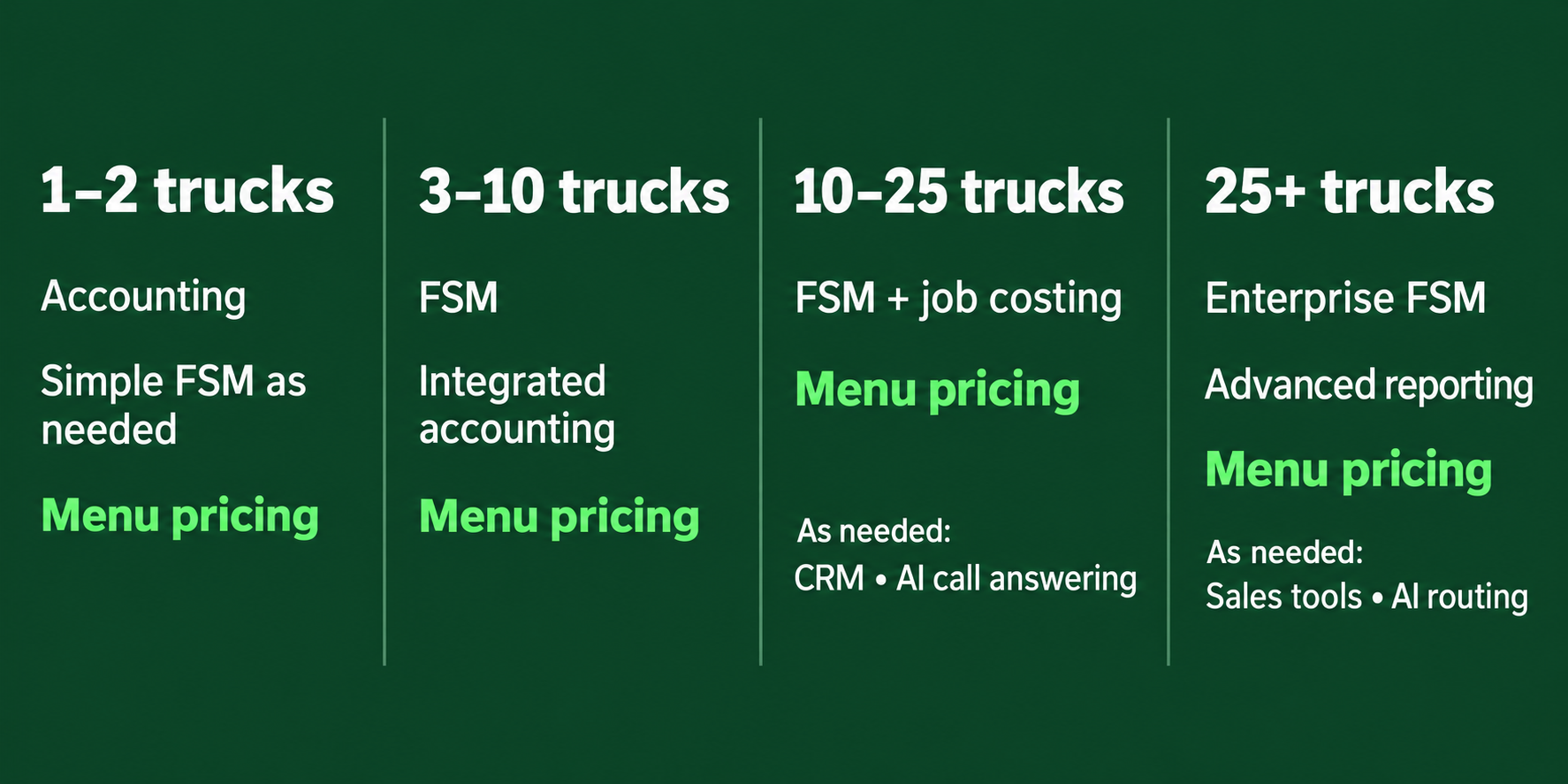
You don't need every tool on day one. Here's what makes sense at each stage.
Solo or one to two trucks. Keep it simple. QuickBooks for the books, an affordable FSM like Jobber or Housecall Pro once you're juggling more than a handful of calls a day, and a pricing system so your prices stay consistent and every call gets the best shot at a strong ticket.
Three to ten trucks. This is where an FSM becomes non-negotiable. Dispatch gets complicated fast, and you need job history, tech assignments, and payments in one place. Make sure it integrates cleanly with your accounting, and put a pricing system in front of every tech so results don't depend on who happens to be on the call.
Ten to twenty-five trucks. You're managing managers now. Reporting matters more, job costing becomes essential, and a CRM starts to make sense if you're adding outbound sales or commercial work. Consider AI call answering if after-hours calls are going to voicemail.
Twenty-five trucks and up. Enterprise platforms like ServiceTitan start to justify their cost here. You'll want deeper analytics, dedicated sales tools, and possibly AI routing. At this size, a small change in average ticket multiplies across hundreds of calls a week.
The one constant at every size: a pricing system. Whether you run one truck or fifty, every call ends with a tech and a homeowner looking at a price. That moment determines your revenue more than any other piece of software you'll buy.
Free calculator
What does every billable hour need to bring in?
Plug in your tech's wage, burden and the hours they actually bill. The free Billable Hour Calculator shows the rate your prices have to start from.
✓Your true billable hour
✓Two short training videos
✓Sent straight to your inbox
Pricing varies widely by vendor, company size, and number of users. Here are typical ranges to budget around.
|
Software type |
Typical monthly cost |
Notes |
|
FSM software |
$59 to $330/month for flat-rate tools; $245 to $500 per tech for per-tech platforms |
Per-tech pricing gets expensive as you hire, since every new tech raises your bill. Ask about setup fees and contract length before you sign. |
|
Menu pricing software |
Most menu pricing tools pay for themselves in the first week. One customer picking a higher option on one call can cover the month. |
|
|
CRM |
Free to $100+ per user |
If your FSM already tracks customers and jobs, you probably don't need one. |
|
Accounting |
$38 to $340/month |
Once you have a few employees, expect to pay $85 to $140. Payroll is extra. |
|
Time tracking add-ons |
$10 to $12 per user, plus a $20 to $40 base fee |
Only worth it if your FSM's time tracking is weak. |

Not sure where your revenue is leaking right now? The Revenue Leak Checklist walks through the spots contractors lose money without noticing.
Take this list into every software demo:
There's no single best HVAC software, because different tools solve different problems. Most contractors need an FSM for scheduling and dispatch, accounting software like QuickBooks, and a pricing system for presenting options on the call. The best stack is the smallest set of tools that covers those needs and that your techs will actually use.
Yes, but less than vendors suggest. A small shop can start with accounting software and a pricing system, then add an FSM once coordinating multiple techs gets hard. Fixing your pricing system early is far cheaper than fixing it after you grow.
Most techs use their company's FSM mobile app for job details, notes, photos, and payments. Many also use a pricing or sales presentation app to show homeowners repair options on a tablet. The key requirement for any field app is that it works fast on a phone, in real conditions.
Most major HVAC software integrates with QuickBooks, but the depth varies a lot. Some sync invoices and payments in real time, while others require manual exports. Ask every vendor to show you the integration working before you sign.
FSM software is one type of HVAC software, focused on scheduling, dispatch, work orders, and job tracking. "HVAC software" is the broader category, which also includes pricing, CRM, accounting, and AI tools. Most contractors use an FSM as the base and add other tools around it.
It depends on the tool. Full FSM platforms can take 60 to 90 days to implement, especially for larger companies migrating data. Tools that layer on top of your existing system, like pricing software, can often be running in days.
No. AI can speed up price book creation and surface patterns in your data, but it can't tell you whether your prices are right or how your techs should present them. AI works best when it has a solid pricing system to work with, not as a replacement for one.
You don't need every piece of software on this list. Every HVAC company needs a way to schedule and dispatch, a way to track the money, and a way to price and present work on the call. Everything else can wait until you have a specific problem it solves.
Of those three, pricing is the one most contractors add last. It should probably come first. Your FSM makes you faster, and your accounting software shows you what happened. Your pricing system decides how much you make on every call your trucks run.
See how menu pricing works on a real service call. Book a demo and we'll show you how it fits with the software you already run. Not ready yet? Start with the free Menu Pricing Toolkit.
Most HVAC contractors choose field service management software by counting features and judging the sales demo. That tells you what a platform can...

 The New Flat Rate : Sep 23, 2026, 10:42:51 AM
If you've been to a trade show, hired a growth consultant, or talked to a SaaS rep in the last year, you've probably heard some version of this: "You...
 Russ Franklin : Oct 1, 2026, 7:45:00 AM
There's no single right brand. A new contractor should choose the distributor first, then pick reliable equipment that distributor supports well....